The Rotunda
The Storefront, Reassembled
The museum's centerpiece: oldindex.html, the firm's homepage as Microsoft FrontPage 4.0 shipped it — running live in the case below. Fifteen header slices, eleven spacer GIFs, four hand-cranked rollover buttons, and one paragraph of confidence, exactly as served. Hover the buttons; they still work. Please do not lean on the glass.
 |
|
|
|
|
|
|
|
|
|
 |
 |
 |
 |
 |
|
||||
 |
|
||||||||
 |
|
||||||||
 |
|
||||||||
 |
 |
 |
 |
 |
|
||||
 |
 |
|
|||||||
|
|
|||||||||||








 is an accomplished web design and development firm that builds exceptional advertising, sales-oriented and database-driven web sites for clients throughout North America. We excel in the ability to design, produce and manage web sites!
Working exhibit · scroll sideways on small screens · buttons wired to the museum map for your safety
“eWebs.net,Inc. is the fastest-growing web host in the world!”
web_hosting.htm, verbatim, punctuation as found
Wing I
The FrontPage Gallery
How the storefront upstairs was made: Microsoft FrontPage 4.0, Photoshop slices, and a 15-cell table held together by 1-pixel spacer GIFs and hope. The museum displays the anatomy so the visitor may appreciate the taxidermy.
The Fifteen-Slice Header
The blue chrome banner in the Rotunda is not one image. It is fifteen, named top_01 through top_15, cut by Adobe ImageReady from top.psd and reassembled in a nested table whose colspan arithmetic must balance like a checkbook. Two representative slices are shown below, exhibited apart from their siblings for study.


Accessions 2003.822.014–021 · _borders/images/top/*.gif · the spacer.gif is 1×1 px and appears eleven times per page load
The _vti_cnf Reliquary
FrontPage shadowed every file with a hidden twin in a _vti_cnf directory — 154 such artifacts were counted in the excavation, none removed. Even bandphotos.zip (Wing VII) has one.
ProgId: FrontPage.Editor.Document · Microsoft Border: tl
Manuscript: the preload incantation
Before CSS could swap a background image, rollovers were hand-cranked. Four hover states were downloaded in advance so the buttons would not flicker on a dial-up line. The Rotunda storefront runs this exact code today; conservators have declined to modernize it on ethical grounds.
Accession 2003.822.009 · oldindex.html, lines 12–41 · running unmodified since 1999
Wing II
The Hall of Commerce
Recovered intact from rates.htm: the firm's complete 2001 price architecture. The visitor is invited to reflect that Package E — thirty HTML pages — cost $7,000, and that this museum contains more pages than that.
Package A
personal homepage or small presence
- two html pages
- three supplied images
- custom graphics
- e-mail address
$250
Package B
small business homepage
- five html pages
- five supplied images
- custom graphics
- top 15 search engines
$1,200
Package C
midsize business site
- ten html pages
- ten supplied images
- custom graphics
- top 15 search engines
$2,400
Package D
large business site
- twenty html pages
- twenty supplied images
- custom graphics
- top 300 search engines
$4,600
Package E
very large business site
- thirty html pages
- thirty supplied images
- custom graphics
- 800 search engines
$7,000
| Domain name registration (two years; $35 each additional) | $70 |
| Domain name setup on our server | $100 |
| Virtual hosting (your site at www.ewebs.net/yourcompany) | $50 |
| HTML page design | $85 / hr |
| Scanned images | $10 each |
| OCR’d pages | $10 / page |
| Animated graphics (“objects that move to draw attention”) | $85 / hr |
| RealAudio sound (welcomes, greetings, music online) | $50 / min |
| Motion video online | $175 / min |
| FLASH / Shockwave design | $100 / hr |
| C, C++, Java programming | $100 / hr |
| Perl & JavaScript (“powerful scripting language for dynamic content”) | $100 / hr |
Monthly Hosting, Package 1
30 MB of space. FrontPage Server Extensions. Unlimited POP e-mail. Unlimited hits, transfers, traffic. Your own CGI-BIN. Detailed statistics — “This is REALLY powerful, shows you how many hits each page is getting, where they are coming from and a lot more.”
$35 a month. Package 2 doubled you to 75 MB for $60 and re-registered your site with the search engines every single month, a service search engines specifically asked people to stop doing.
For calibration: this museum page is heavier than an entire Package 1 allocation would allow, and it is hosted for $0.
Accession 2003.822.030 · rates.htm · 31 KB of nested table markup
Curator’s note on pricing philosophy
“You can find cheaper prices, but would you let your 12-year-old nephew design your annual report or your product brochure?”
rates.htm, unedited. The nephew is now roughly 37 and works in DevOps.

eCommerce Total Package (purple state)
Internet Store. The Amazing Buy_Me Button. Cyber Circular. All three amazing products, one low price: $49.95 per month. The underscore in Buy_Me was load-bearing.
Accession 2003.822.038 · images/top.gif

eCommerce Total Package (green state, expanded)
A later revision adds the EZ Payment Gateway at $39.95 (“Check me out”). Scholars disagree on whether green or purple came first; the file dates are identical to the second.
Accession 2003.822.039 · images/ecommerce.gif
Wing III
The Server Room: a Cobalt RaQ Liturgy
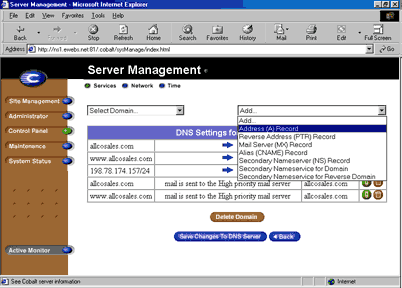
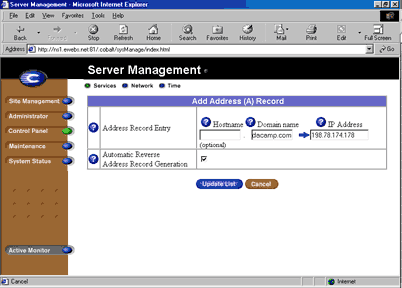
From serversetup.htm: “HOW TO ADD A NEW DOMAIN TO YOUR SERVER,” a 22-step illustrated rite for the firm's Cobalt server — screenshotted step by step in Internet Explorer 5 at ns1.ewebs.net:81, complete with A records, reverse-DNS checkboxes, and a /24 that must become a /26 for reasons the liturgy does not explain. Every surviving screenshot is displayed. One is lost.
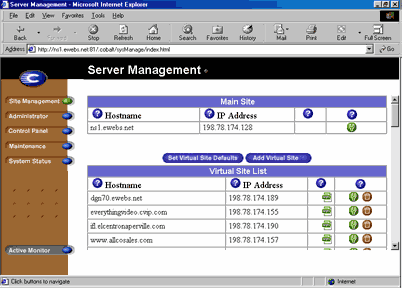
Type www.yoursitehere.com/admin. Enter your Master Username and Password. Click “Control Panel.”
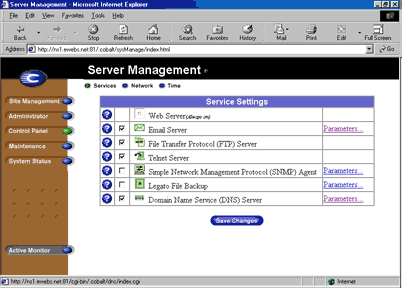
Click “Parameters” next to “Domain Name Service (DNS) Server.”
Select “Address (A) Record” from the “Add...” drop-down menu.
Type the domain and the IP. Make sure “Automatic Reverse Address Record Generation” is checked. “Update List.”
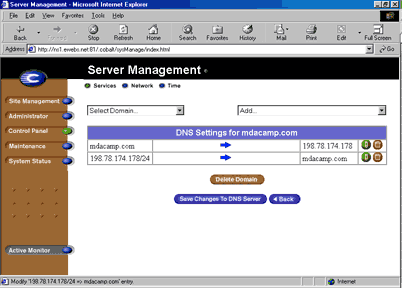
Select the GREEN button with the pencil next to the IP with the /24 at the end. (This is the edit button.)
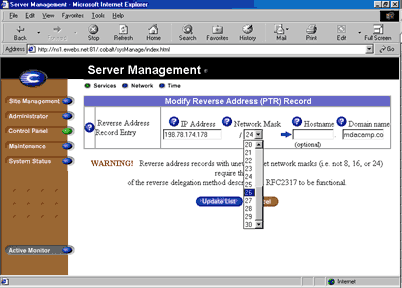
Change the 24 to 26 under the “Network Mask” dropdown. Then click “update list.”
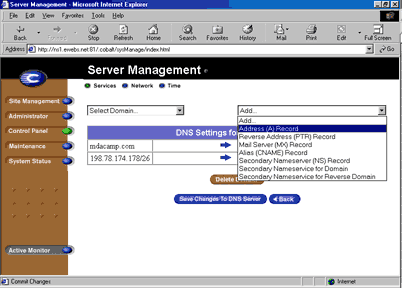
Select “Address (A) Record” from the “Add...” menu, again.
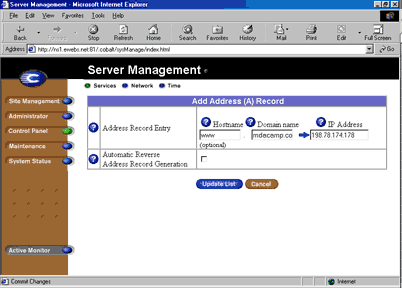
Add “www” under Hostname. This time UNCHECK “Automatic Reverse Address Record Generation.”
Select “Mail Server (Mx) Record” from the “Add...” menu.
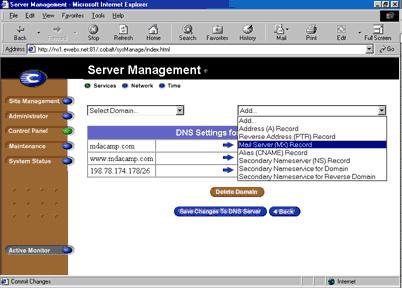
Domain name: yourdomain.com. Mail Server Name: yourdomain.com. Click on “Upate List.” [sic]
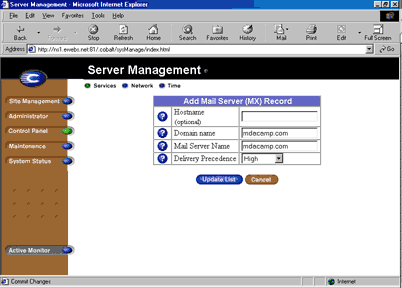
“Mail Server (Mx) Record” from the “Add...” menu, a second time.
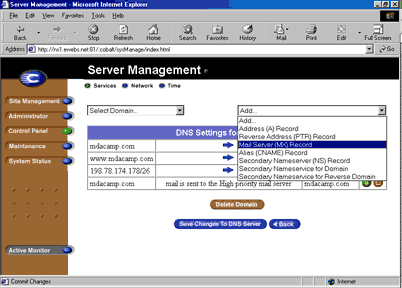
The second MX, for the www host.
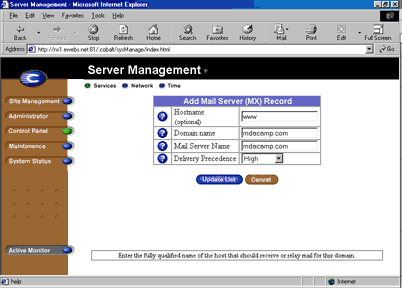
www next to Hostname; yourdomain.com next to Domain name and Mail Server Name. “Upate List” once more.
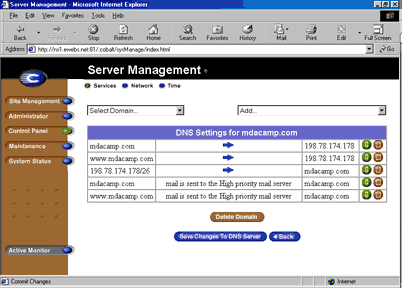
Click “Save Changes To DNS Server.”
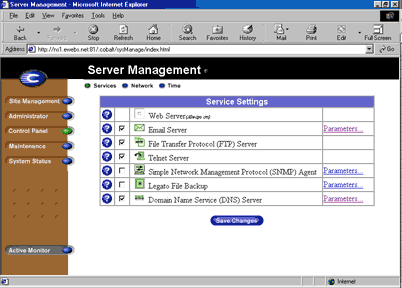
Click “Save Changes” or “Site Management.”
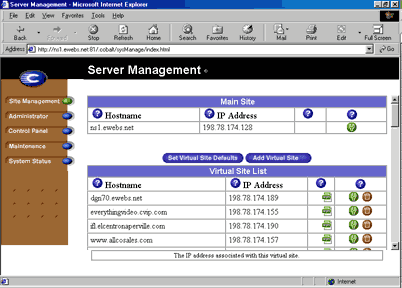
Click “Add Virtual Site.”
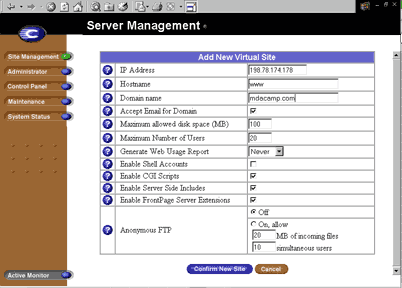
IP address, “www,” domain name. “Confirm New Site.”
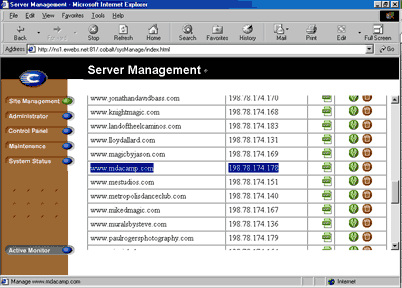
Find your domain and select the Green Edit button next to it.
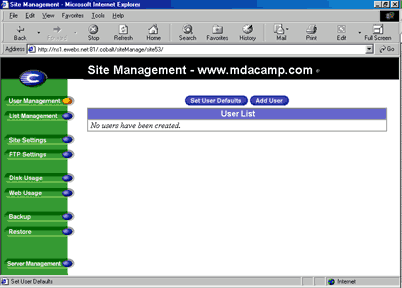
Click “Add User.”
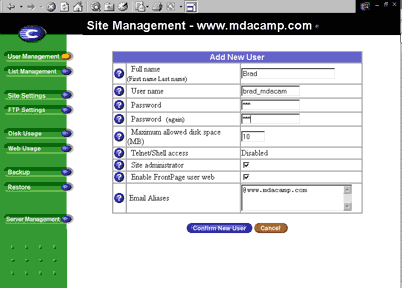
Full name, username (“Must be the only one on the server”), password twice. Check “Enable FrontPage user web” if you want FrontPage access. Make sure you hit enter after each alias.
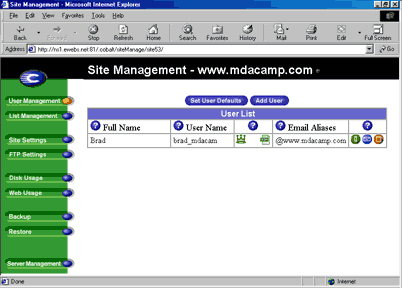
Click the Blue Mail button next to the user. The @www account MUST always be the account on the bottom for it to work.
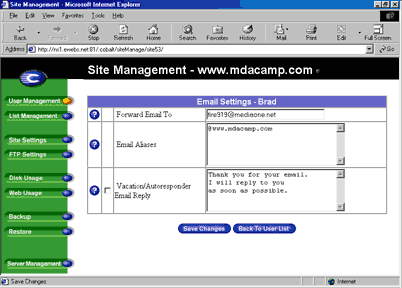
Add the forwarding address, “Save Changes.” Your new domain name has now been added to the server!
The one warning in the entire document — step 18, capitalization original
“NOT THE ORANGE TRASH BUTTON — THIS WILL DELETE THE DOMAIN”
Twenty-five years later, the museum's parent project operates under the same policy.
Accession 2003.822.070 · serversetup.htm + images/serversetup/1–22.gif (3.gif never uploaded) · visible in step 1: real client hostnames on ns1.ewebs.net, 198.78.174.0/26 · the Cobalt RaQ line was discontinued in 2003, taking its green pencil with it
Wing IV
The Pavilion of Dead Technologies
Every specimen below was found alive in this docroot. All are now extinct in the wild. Please do not tap on the plugins.
RealNames · 1996 – 2002
The Keyword Resolver
A scheme to replace URLs with paid “Internet Keywords.” ewebs.net embedded this affiliate search box (provider ID 1102758) pointing at navigation.us.realnames.com/resolver.dll. RealNames died in May 2002 when Microsoft declined to renew; the box has resolved nothing for twenty-four years. Reproduction below, permanently disabled.
Accession 2003.822.044 · realnames.htm
RealPlayer 8 · fl. 2000
Streaming Video, Three Bitrates
The video page offered work for radio station 92 KISS FM in 56k Low Quality, 56k High Quality, and T1, ISDN, DSL High Quality — plus one QuickTime .mov for the aristocracy. Visitors were first directed to “Click Here to Get RealPlayer 8,” beginning a relationship with pop-up renewal notices that outlived the station’s format.
Accession 2003.822.046 · video.html
FrontPage Server Extensions · 1996 – 2006
The Publishing Rite
Sold as a hosting feature in every package. The docroot retains its ritual objects: _vti_cnf shadow-directories beside every file, _borders/, and postinfo.html, which explains the Microsoft Web Publishing Wizard to nobody.
Accessions various · 154 _vti_ artifacts counted, none removed
Miva, ColdFusion, Apache::ASP · fl. 2003
The Test-Page Catacomb
Under test.old/, the panel auto-generated capability shrines for nine server technologies: apacheasp, cgi, coldfusion, fcgi, miva, perl, php, python, ssi. The Miva page survives to certify a “possibility to get the extension environment settings” that no one ever checked.
Accessions 2009.1021.* · test.old/*/test.html
Windows Media Video 8 · fl. 2003
The .WMV Vault
Two reels survive: longvideo_01.wmv (1:44, a stage-magic performance) and interlake.wmv (14:50 of steel-processing machinery at 320×240, encoded with WMFSDK 8.20). Both have now been restored from Windows Media 8 and are screening continuously in Wing VIII. The originals remain in the vault, un-deleted, as is museum policy.
Accessions 2003.822.051–052 · restored 2026
The Webalizer & AWStats · 2001 – 2009
Attendance Records
Monthly visitor ledgers survive continuously from March 2001 to October 2009 — six years past the site’s own death. The server kept counting after everyone went home, which is the most early-web fact in this museum.
stats/usage_2001*–2002*, cgi-bin/awstats*2003–2009 · 234 files
Wing V
The Browser Bestiary
From the AWStats icon collection shipped with the site’s statistics package: the fauna a webmaster of 2003 was prepared to encounter, pinned at their original 20 pixels. Status assessed 2026.
 Netscapeextinct 2008
 Internet Explorerextinct 2022
 Lynxstill alive
 Operareincarnated
 WebTVextinct 2013
 Dreamcastextinct 2003
 iCabstill alive
 Konquerorendangered
 Amayaextinct 2012
 Galeonextinct 2008
 OmniWebextinct 2012
 NetPositivedied with BeOS
 IBrowseAmiga, alive
 StarOfficeextinct 2011
 Go!Zilladownload manager
 WebCopiersite ripper
 BeOSextinct 2001
 OS/2extinct 2006
 AmigaOSimmortal
 CP/Malready extinct then
 NeXTSTEPbecame macOS
 Windows 98extinct 2006
 Windows MEmercy, 2006
 WebTV OSextinct 2013
Accessions 2003.822.icon.* · icon/browser/, icon/os/ · 343 icons held, 24 displayed. The collection also includes 250 national flags and nine CPU manufacturer badges, available to researchers by appointment.
Wing VI
The Client Wall
Transcribed from clients.htm without alteration, including the load-bearing parenthetical. Condition of each site surveyed July 2026. Two entries remain clickable — the museum encourages the visitor to try them and see where a quarter-century of uptime leads.
- www.rollingstone.com still standing
- www.tunes.com gone
- “(webcasting only for the above sites)” — sic
- www.american-av.com changed hands
- www.starop.com gone
- www.cordley-temprite.com gone
- www.ginkgoint.com gone
- www.bsvp.com alive — still answering, 25 years on
- www.allcosales.com gone
- www.fenderanddonisch.com gone
- www.zerogravityclub.com gone
- www.chezaday.com see curator’s note
- www.ivavideo.com gone
- www.mestudios.com changed hands
- www.randallstudio.com gone
- www.clubvortex.com gone
Curator’s note: the mis-wired anchor
In the original 2001 HTML, the link whose text reads www.chezaday.com does not point to chezaday.com. Its href is http://www.prestoproductions.com — a paste error that sat unnoticed in the markup for twenty-five years. The museum preserves the fault exactly as found: click the chezaday entry above and you will arrive, as every 2001 visitor would have, at Presto Productions — which, unlike most of this wall, is still in business. So is bsvp.com. Some client relationships outlive the firm, the CMS, the format war, and arguably the point.
clients.htm, line 74 · both destinations verified live, 2026
Wing VII · The Print Room
The Family Band: The Ways of Living
On the afternoon of January 10, 2003, someone at the firm fed a stack of 1960s photographs through a scanner, zipped them into bandphotos.zip, left the file in the root of the company docroot, and linked it from nowhere. A web server, it turns out, is where a family keeps things. All ten prints are displayed below — the museum's most valuable holding and its least explicable.
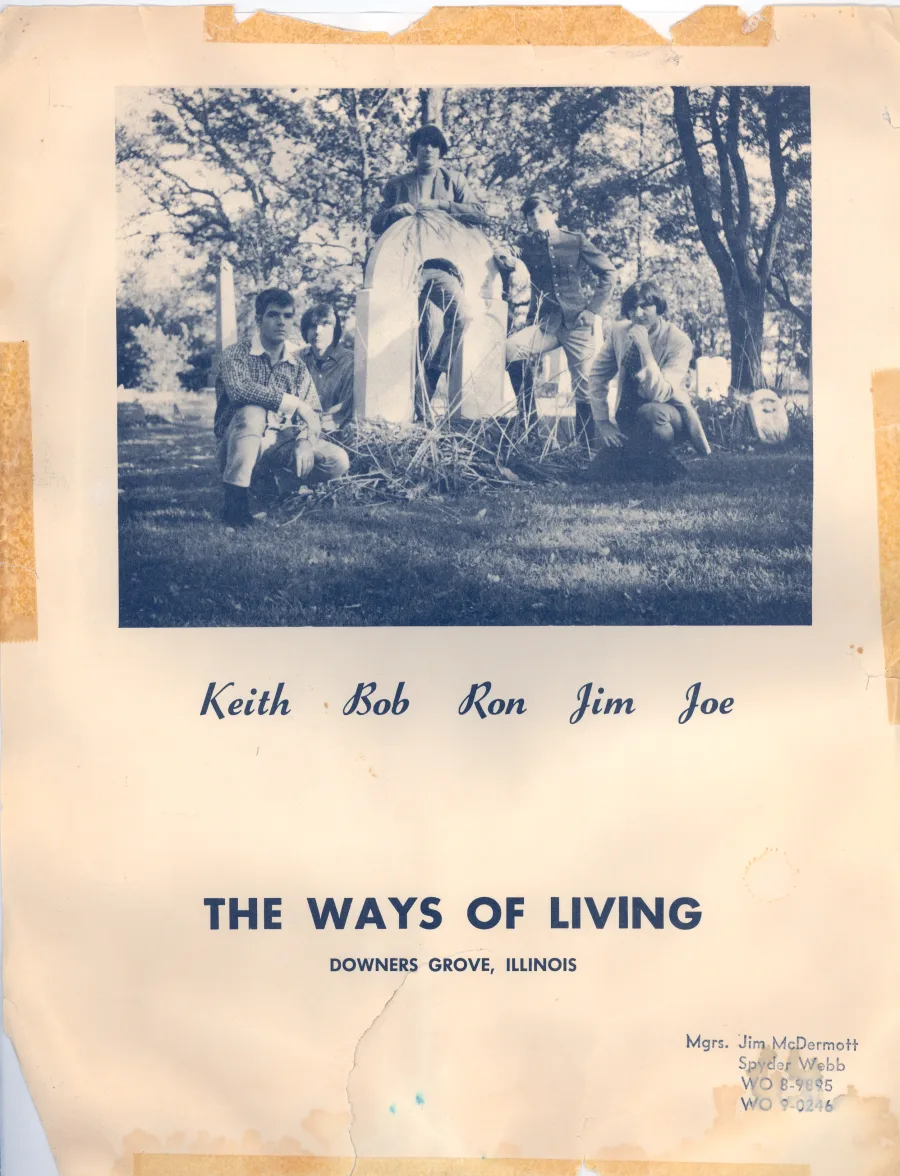
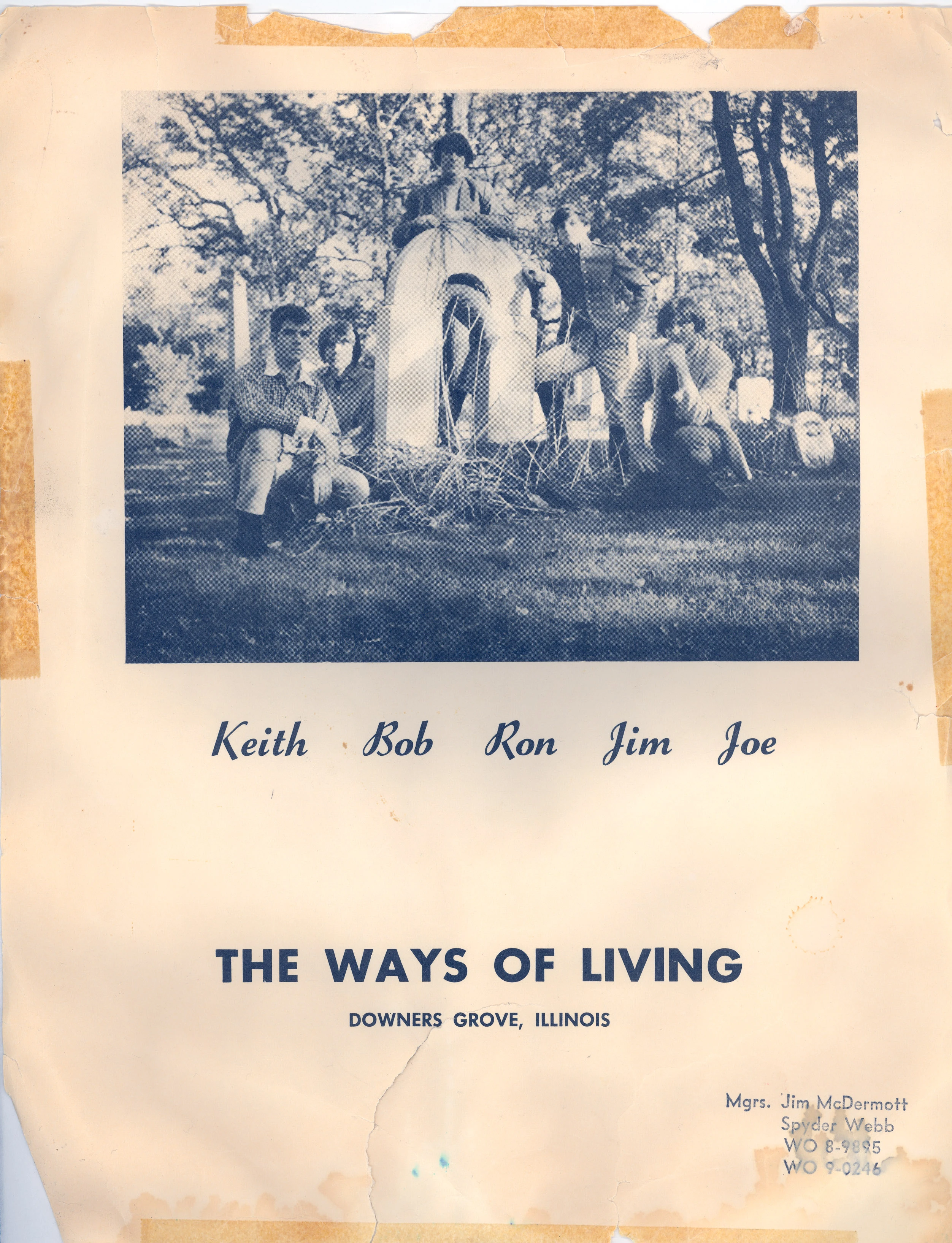
Keith · Bob · Ron · Jim · Joe
The largest scan in the zip — 2504 by 3270 pixels, the one the scanner operator lingered over — is the band’s own promotional card, taped at the corners from decades on somebody’s wall. It is how the collection identifies itself: The Ways of Living, of Downers Grove, Illinois, managed by a Jim McDermott and reachable at exchange-name phone numbers that have not rung as dialed since area codes grew a third digit.
Downers Grove is also where ewebs.net hung its shingle thirty years later, and the Jim of the card is the family’s own: the same Jim Mulvey whose name appears on the Hilton Head annex in Wing VIII and whose firm ran the server this zip was found on. The band on the card is the house band of the family that built the host — scanned onto company hardware one January afternoon, and thereby accidentally preserved for this museum.
The prints run from a four-piece in matching red shirts (the drum head bears an earlier, half-legible name) through backyard shows, a packed gym dance, and a gold brocade jacket under a lodge ceiling. Nothing here was retouched; every crease, tape mark, and thumbprint ships at full scanned resolution.
Enter the full gallery — all ten prints, annotated →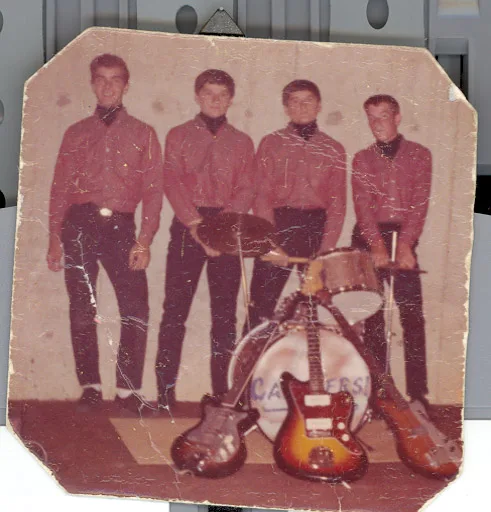
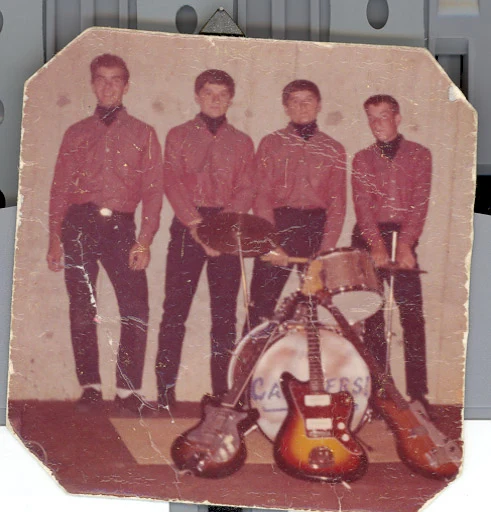
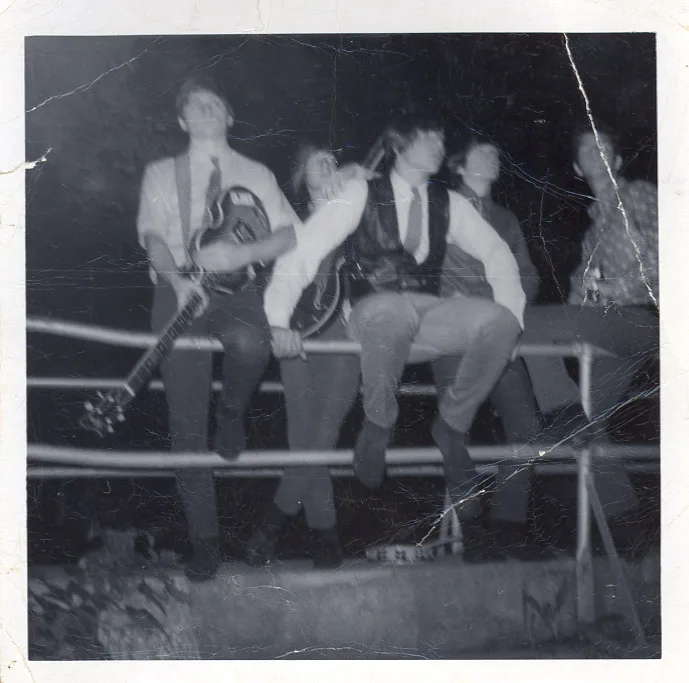
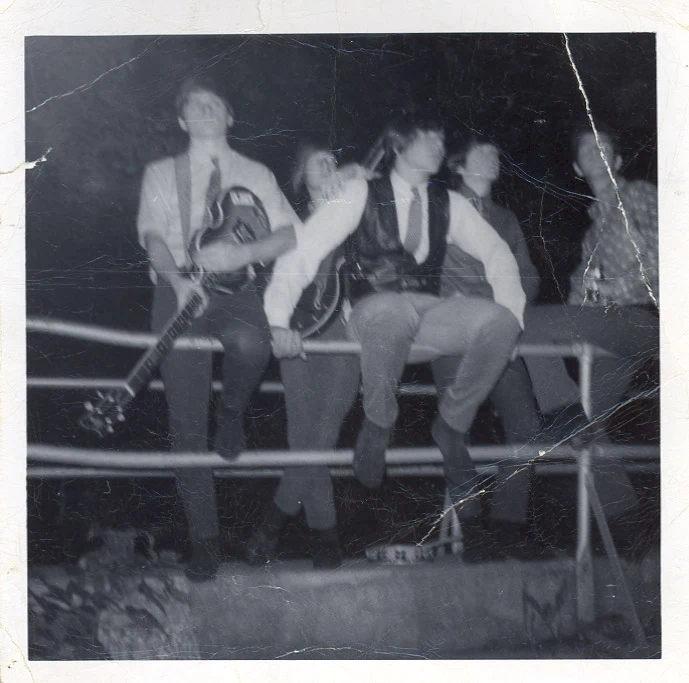
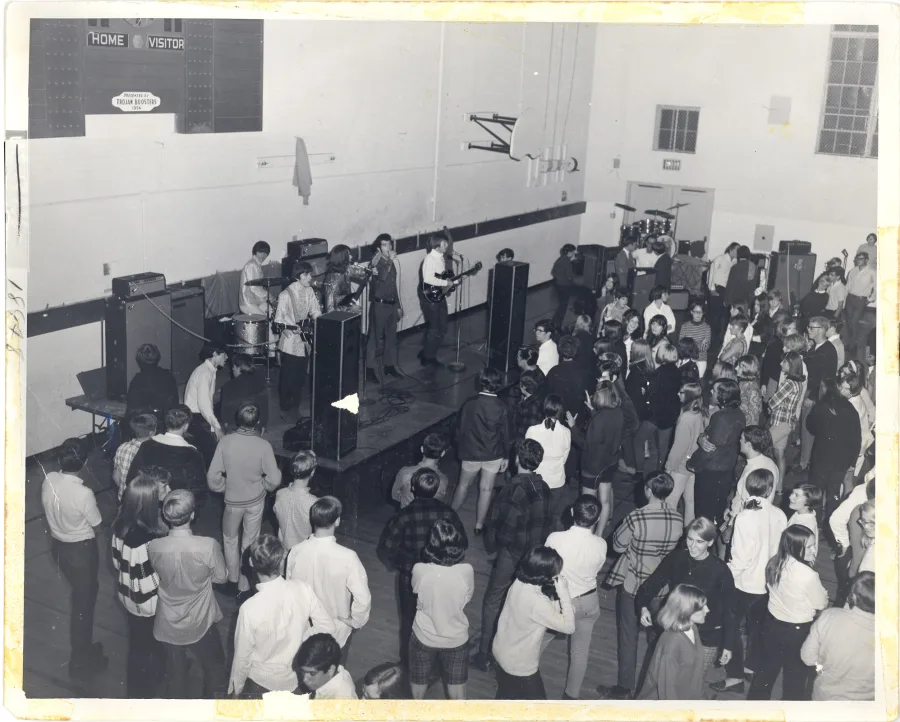
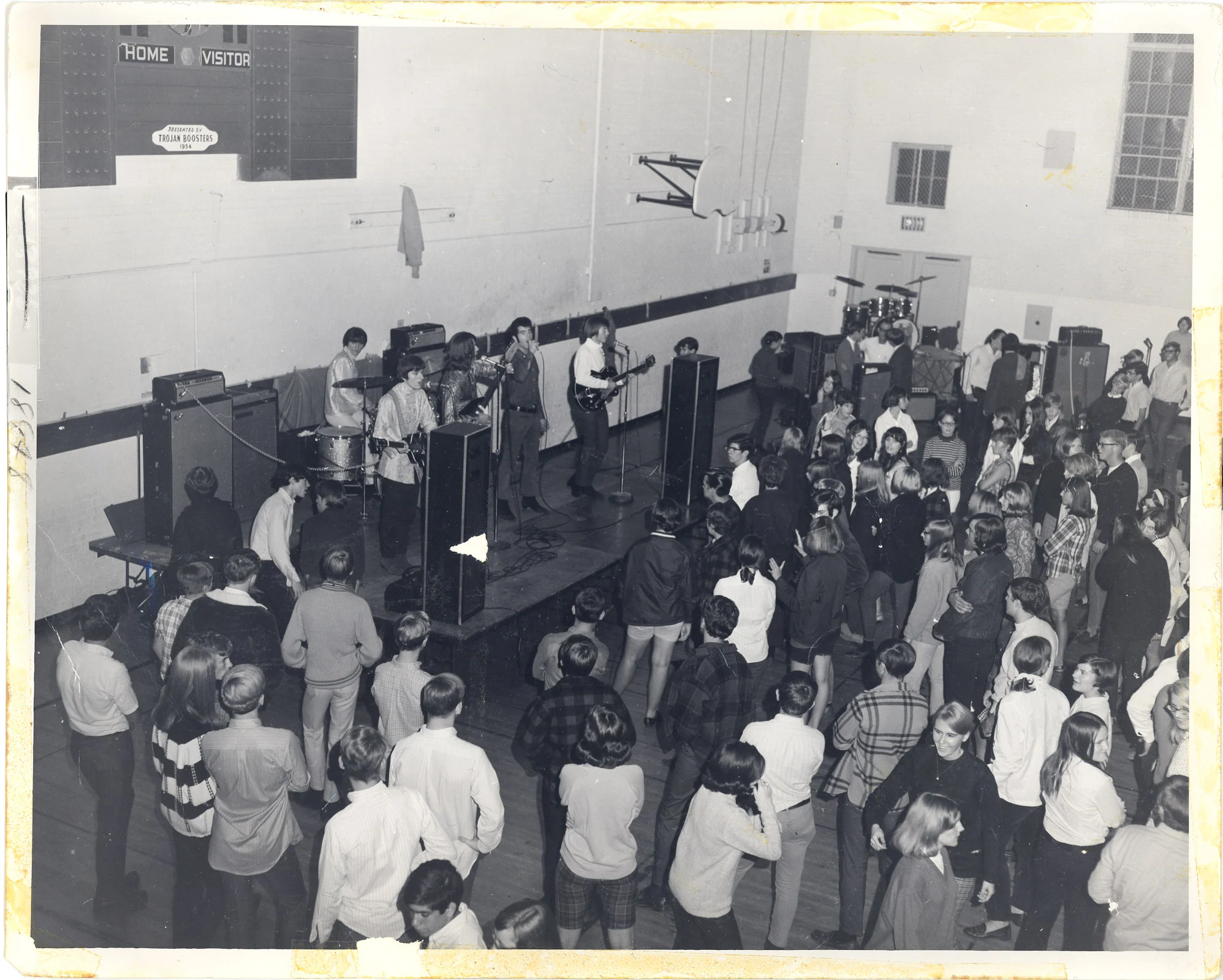
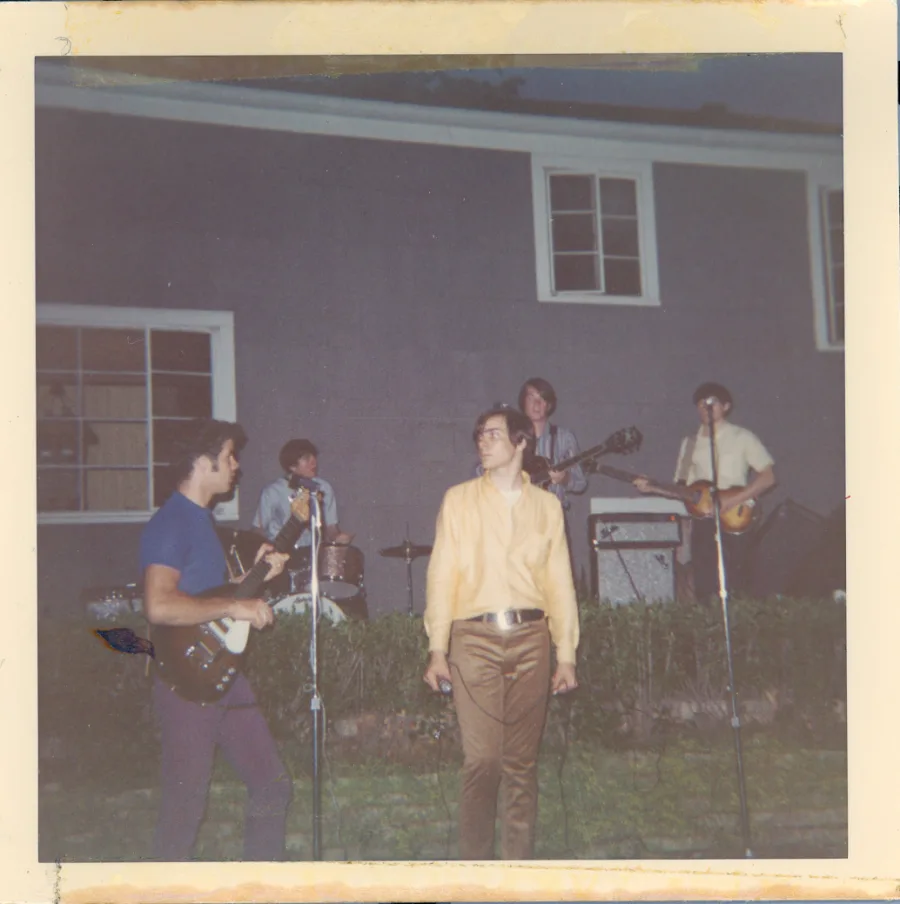
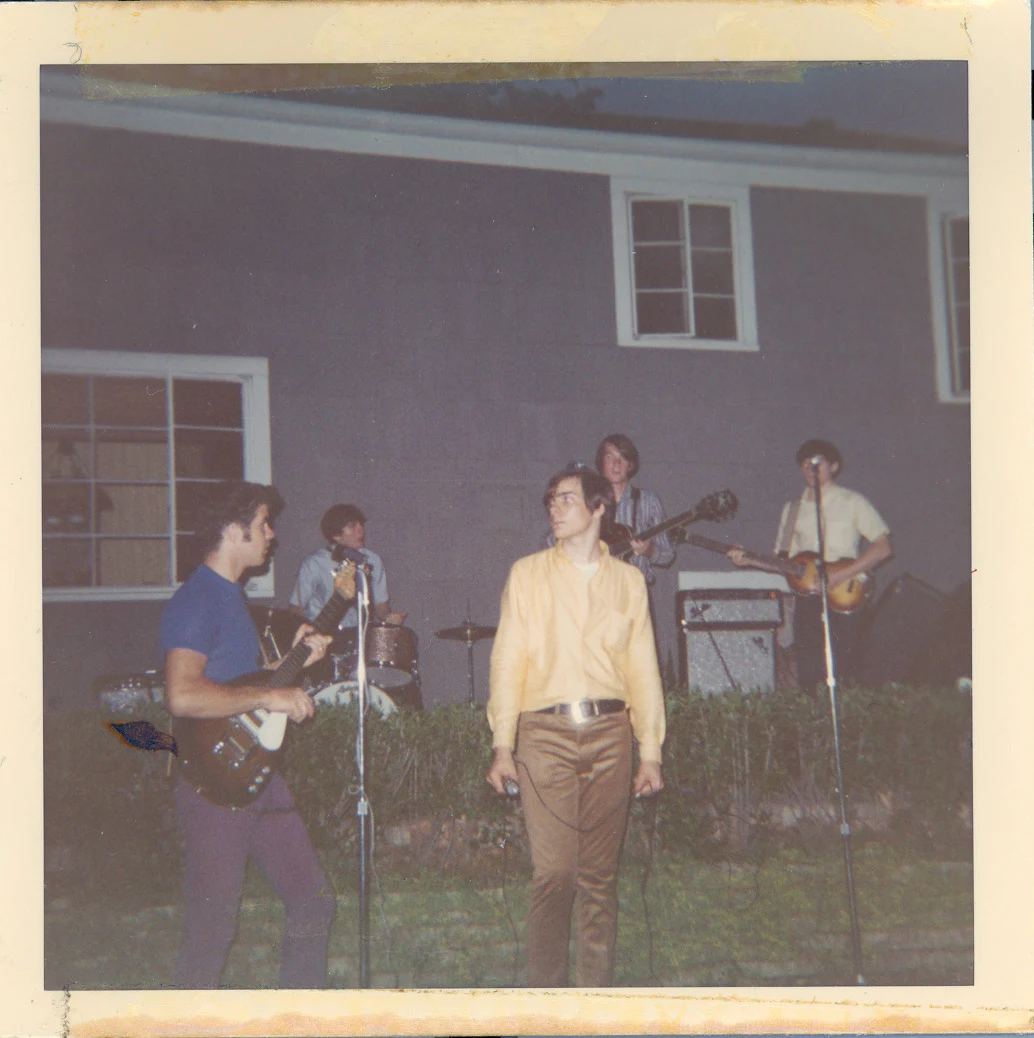
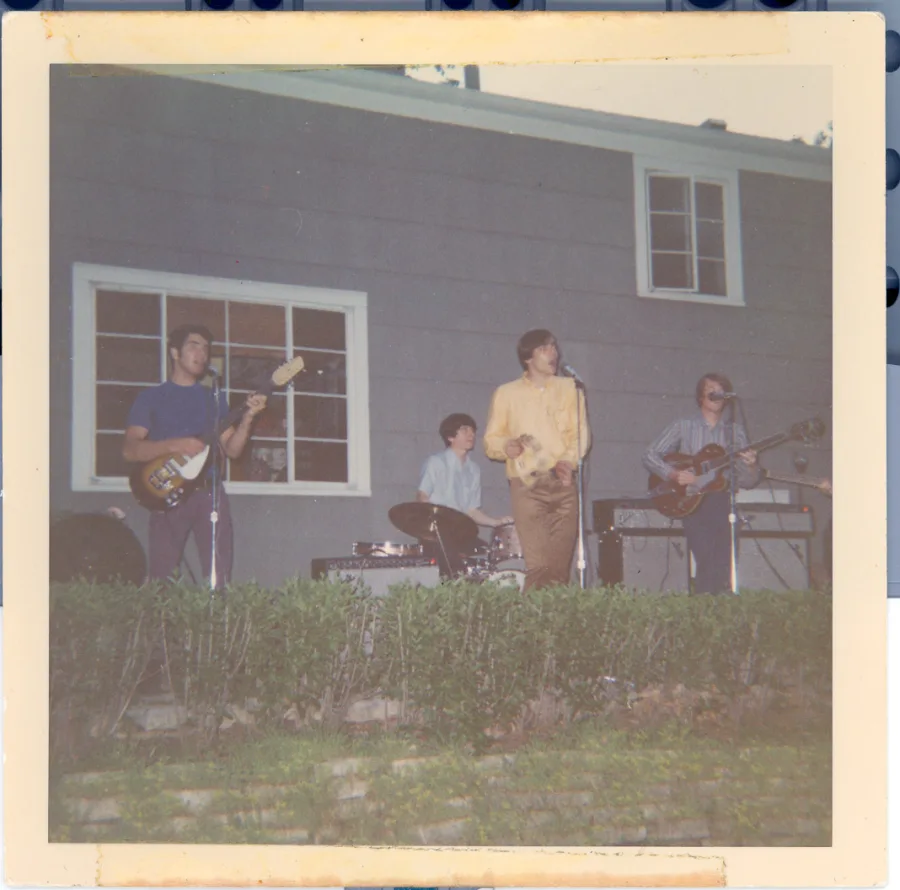
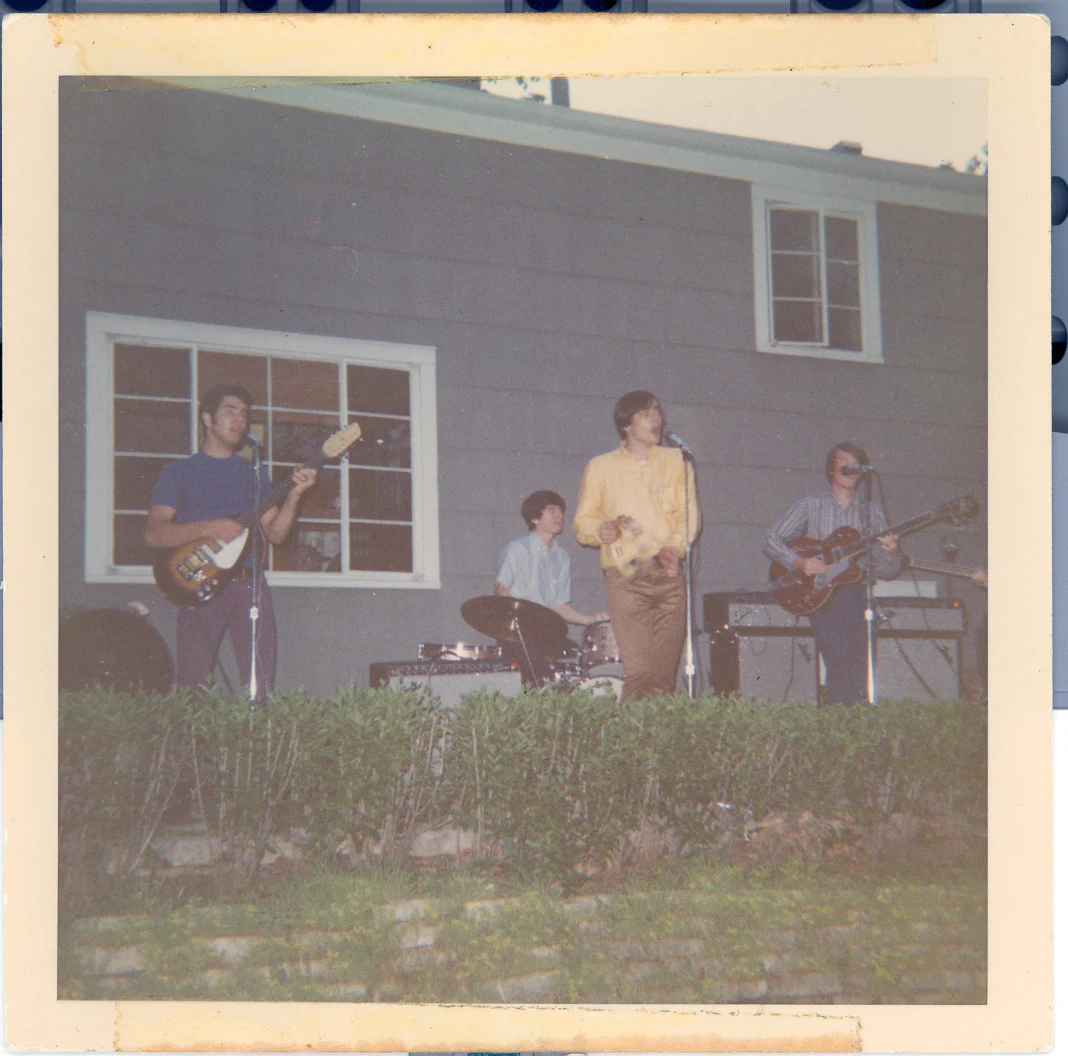
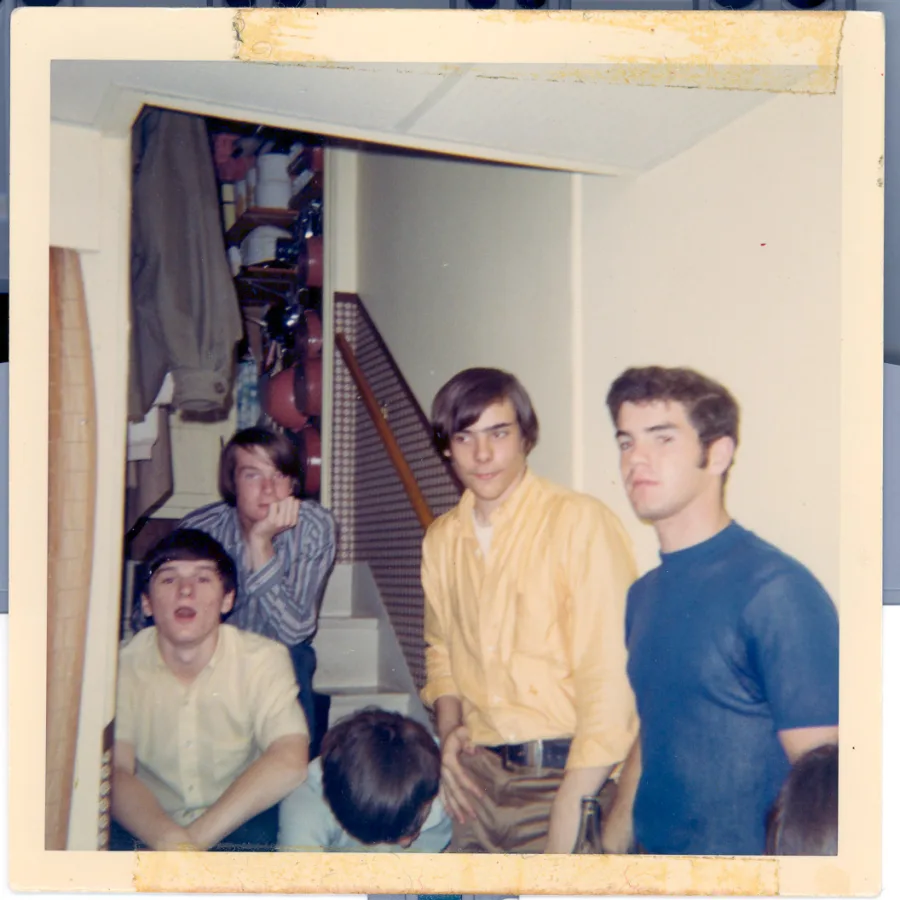
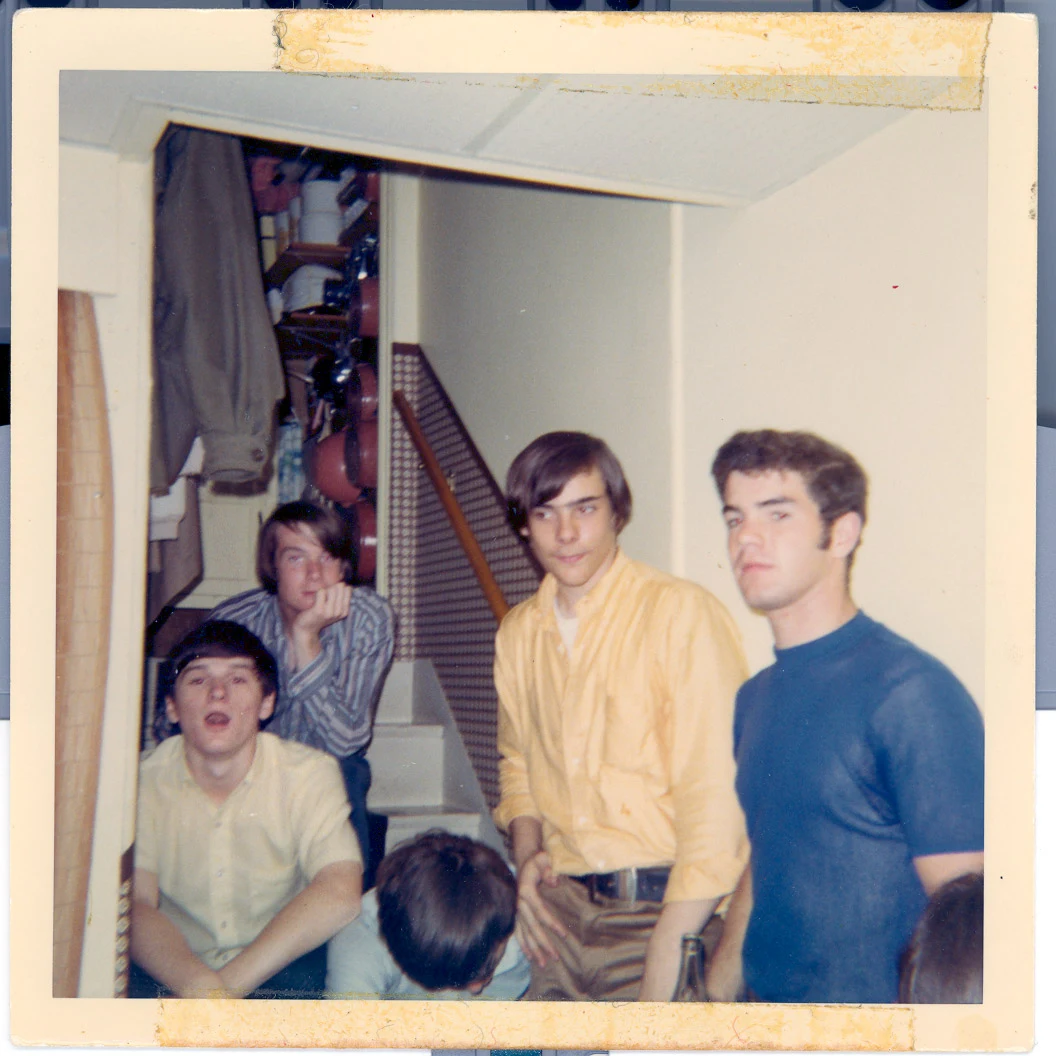
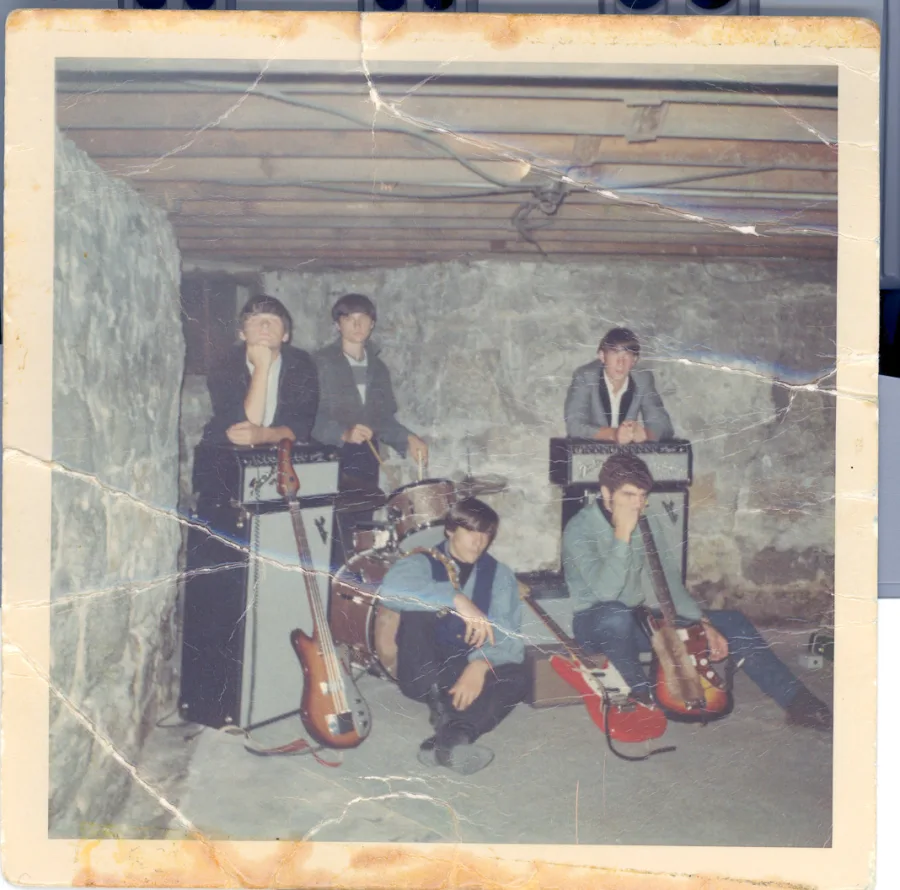
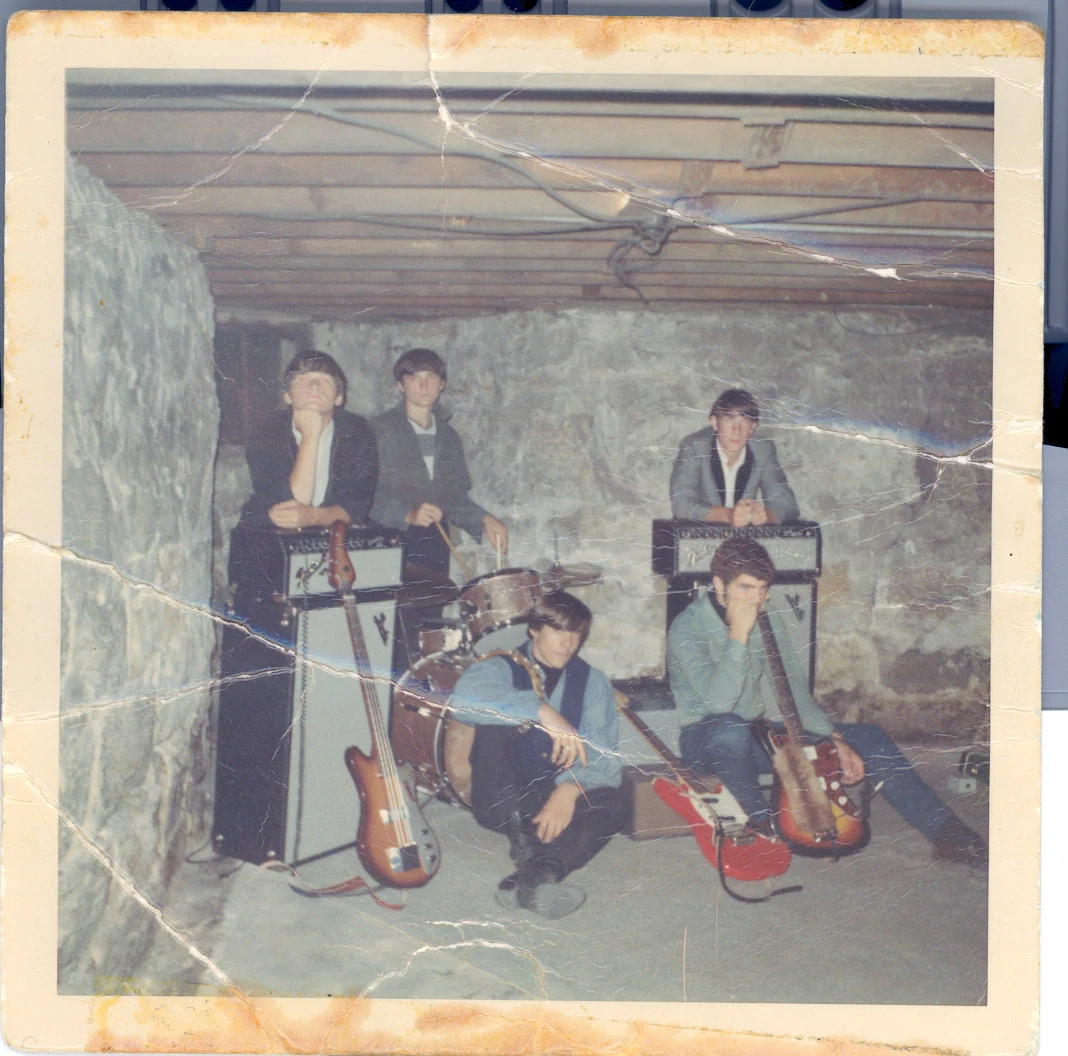
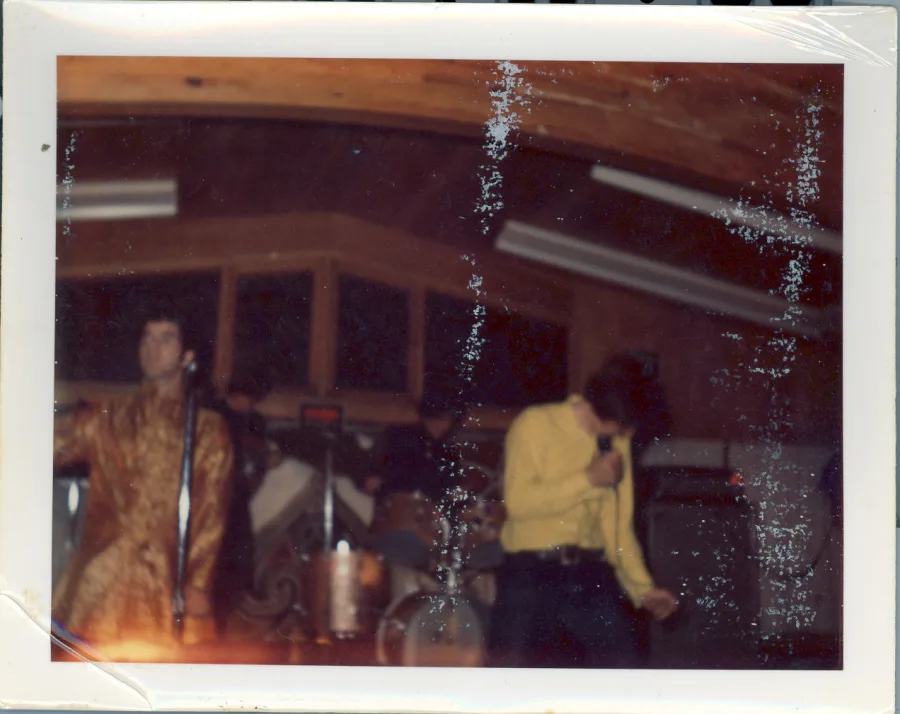
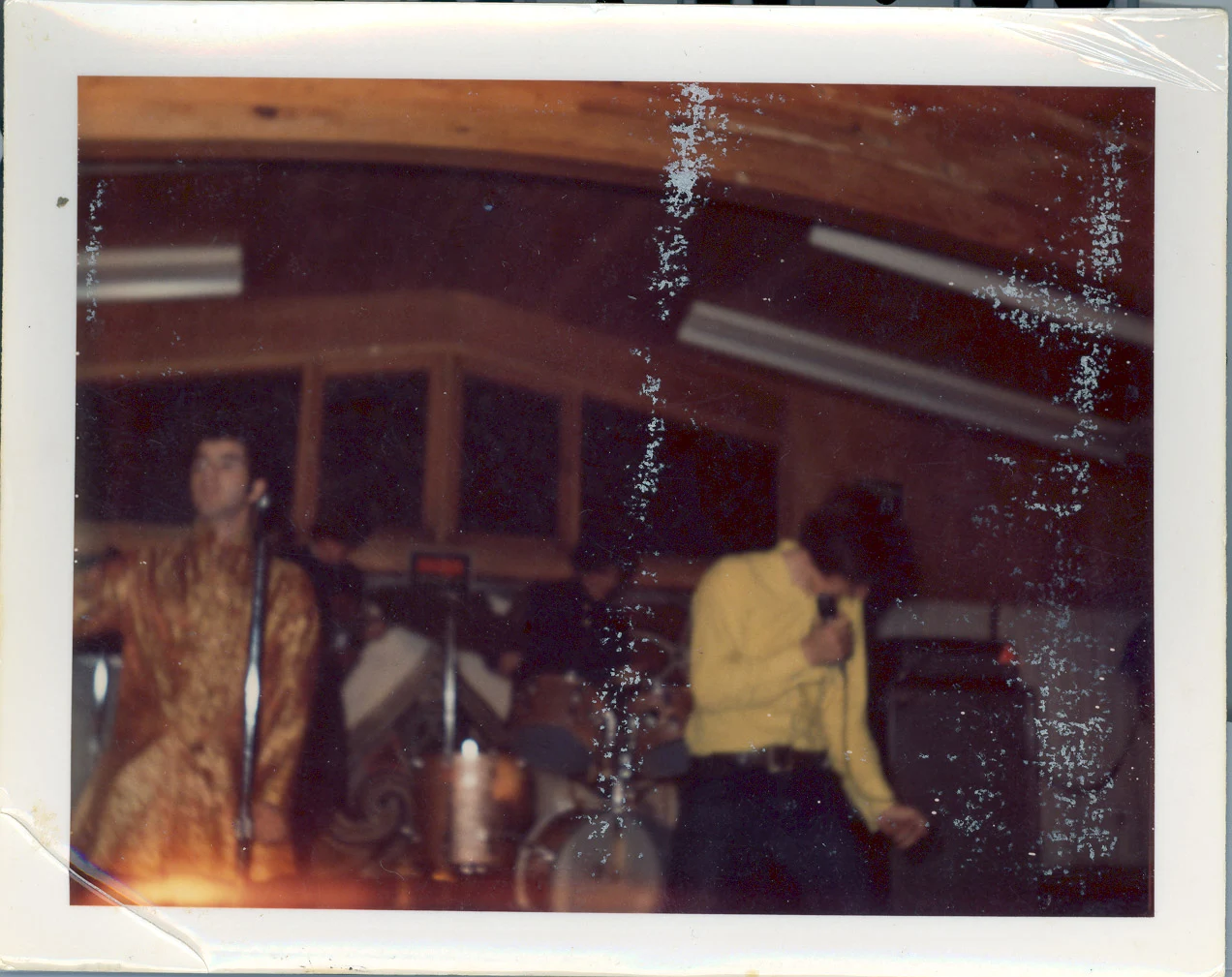
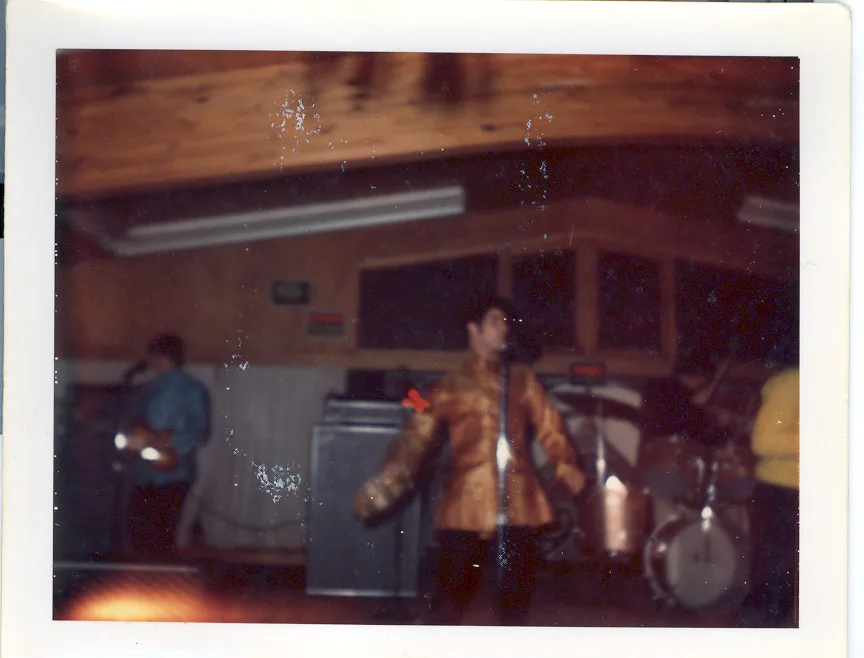
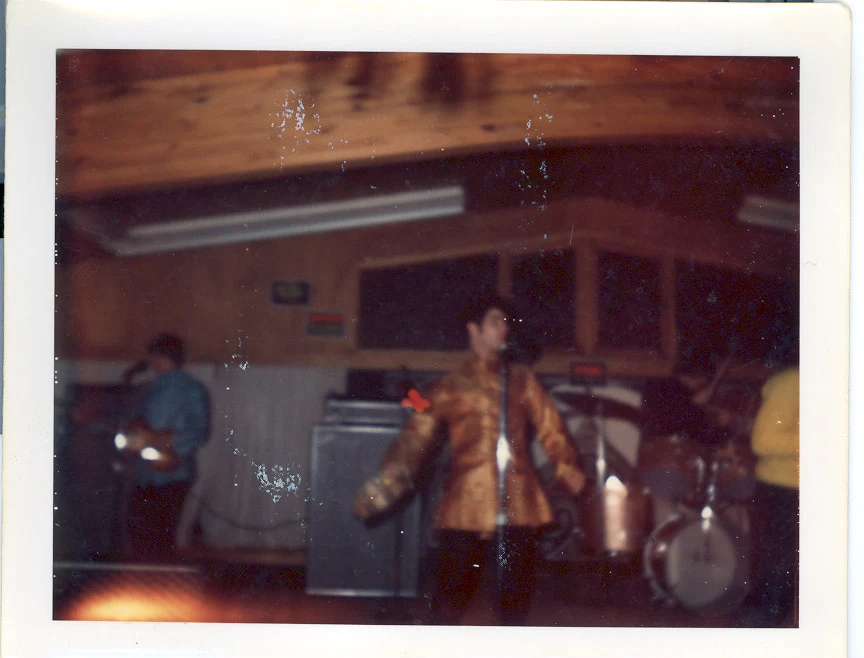
Accessions 2003.110.001–010 · bandphotos.zip, 4.6 MB, scanned 2003-01-10 15:41–15:45 · numbering skips 008, as found · original zip retained in the vault and flagged for permanent preservation
Wing VIII
Found in Storage
More objects discovered in the docroot with no link pointing to them — the museum’s favorite provenance.
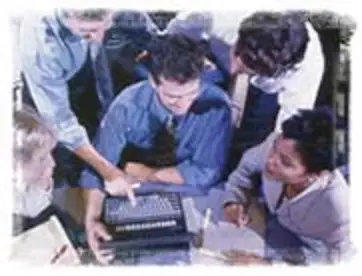
The Team
The only known photograph of the firm: staff huddled around a single keyboard, in the classic stock pose of an industry that had not yet decided what work should look like. Displayed at twice original size; the original is 181 pixels wide. It also appears in situ on the Rotunda storefront.
Accession 2003.822.006 · images/group.jpg · 8 KB
Listening Bench: the loose MP3s
Two audio files sat in the docroot root, adjacent to nothing. Given the client wall lists a club named Vortex, vortex.mp3 may be a commission; spikes.mp3 keeps its secrets. Headphones recommended; expectations optional.
spikes.mp3 · 2:45
vortex.mp3 · 2:20
Accessions 2003.822.055–056 · 4.5 MB combined, an entire month of a lesser host’s bandwidth
Screening Room A: longvideo_01.wmv
Filed on wizard.html — an Adobe GoLive 6 page whose entire body was one link. A stage-magic performance, 1:44, restored from Windows Media 8 to a format your device can decode without installing anything from a magazine cover disc.
Accession 2003.822.051 · converted 2026, original .wmv preserved
Screening Room B: interlake.wmv, restored
The vault’s largest reel, now screening in full: fourteen minutes and fifty seconds of steel-processing machinery — presses, control cabinets, coil lines — shot on a factory floor and encoded at 320×240 for a client the docroot does not name. Industrial video was on the rate card at $175 a minute, which prices this artifact at $2,600. The museum finds it strangely watchable.
Accession 2003.822.052 · interlake.wmv, 27 MB, WMFSDK 8.20 · restored to H.264, 2026 · original .wmv preserved
The Hilton Head Annex
condo.html: a page for a beachfront villa at the Hilton Head Beach and Tennis Resort — ten tennis courts, the largest pool on the island — parked in the company docroot, six photographs, “click on a photo to enlarge.” The page ends: “Our full website will be up in July. For more info contact Jim Mulvey.” The year is not specified. It did not go up in July. All six photographs are shown; the phone number remains between Jim and the resort.
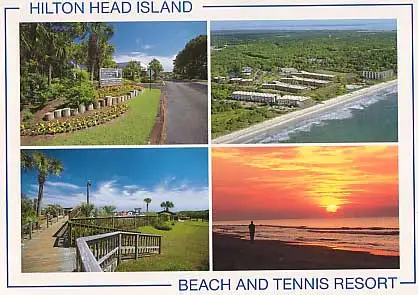
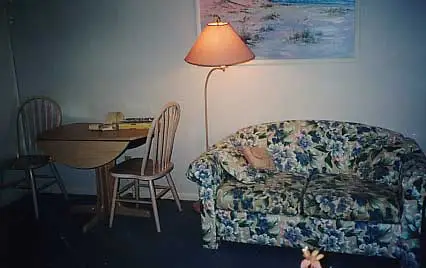
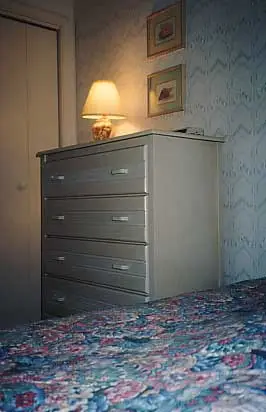
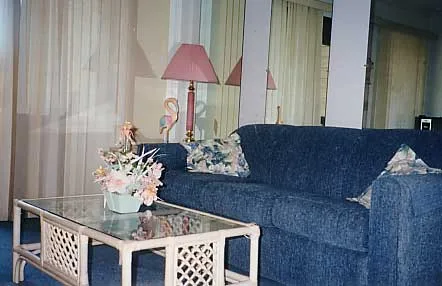
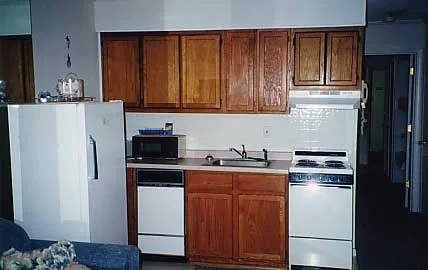
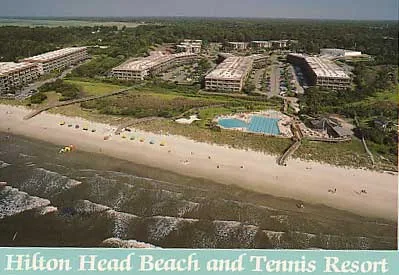
Accession 2003.822.060 · condo.html + hiltonhead/*.jpg, six photos with six _small thumbnails · the family thread continues in Wing VII
The LensDoc Comp
A year-2000 homepage mockup for LensDoc.com, delivered as one large GIF with a stern warning that the artwork is “protected, under international copyright law, against reproduction in any manner.” The museum reproduces it in this manner.
Accession 2000.x.001 · lensdoc.htm + images/lensdocmockup.gif
The Feedback Form
test.htm, a FrontPage WebBot form asking what kind of comment you would like to send: Complaint, Problem, Suggestion, Praise. Its footer reads, in full and unedited:
Copyright © 1999 [OrganizationName]. All rights reserved.
Revised: June 17, 2002.
Three years in production. The placeholder held.
Accession 2003.822.048 · test.htm · the WebBot never sent a single comment anywhere
The Last Room
How It Ended
At some point after 2003, visitors to ewebs.net stopped finding the blue chrome and the rollover buttons. The homepage was quietly renamed oldindex.html — the museum piece now standing in the Rotunda — and in its place went a single gray page: the splash graphic below, three words, and a door.

images/splash.jpg · 596 × 299 · Web Design : eCommerce : Web Hosting : Internet Marketing : Video Streaming : Motion Graphics : Search Engine Optimization — the colon was the ampersand of its day
is now
ENTER WWW.AREA51STUDIOS.COM
The firm folded into its successor and the domain became a signpost. The signpost then outlived the successor’s relevance, the server it pointed from, and very nearly the century’s first quarter. The files behind it were never deleted — only unlisted, which on the early web was the closest thing to an afterlife.
Museum colophon
This museum was assembled in July 2026, during the decommissioning of the dedicated server that carried the ewebs.net account for its final decades, and expanded later the same month: the storefront was reassembled, the Cobalt RaQ liturgy hung, the Interlake reel restored, and the family band prints moved from the vault to permanent public display. Every image, price, quotation, and file date is real and was recovered from the original docroot. The account also held 2.65 GB of mail and eight years of visitor statistics, which the curators counted but did not read.
One 30 MB hosting package, as it happens, would hold everything here except the machinery footage.